A budget is a projection of how much money you will spend or earn in the near future. Actually chances are you already do this in some way or another because anytime you figure out how much money you will have left at the end of the month after paying your bills, you are creating a budget. You can use budgets to estimate future income and expenses, and create "what if?" scenarios. As time goes by, you can create reports to compare actual incomes and expenses with your budget. It is a good idea to use budgets before making any major decisions. To ensure your financial goals can be reached, first create a budget and enter all the numbers so you can adjust and rework them as many times as necessary.
Typically a budget is created for a specified period of time. At the end of that period you can then compare your actual expenses and earnings with your predicted budget numbers. This can give you a good measure of the health of your economy. To create a budget go to the Budgets panel. Click on the budget pull-down menu and select 'New Budget'. Then enter a name for that budget.
The account list is then automatically filled up with your current accounts ordered hierarchically and grouped by types (Incomes and Expenses) and categories. You can then edit each entry individually by changing the amount, the interval and activating or deactivating it.
Below the account list is the Summary information. It shows Incomes and Expenses totals along with grand totals for each period of time. This summary is automatically updated as soon as you make changes to the account list. Deactivating an entry will remove its associated amount from the summary. That allows you to temporarily deactivate entries and create "what if?" scenarios.



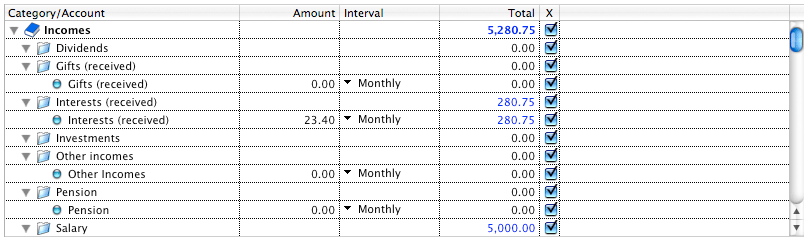

 Compute the total or the average Incomes/Expenses for a selected set of accounts.


 Maxprog ® by Stan Busk - © 2001-2026 Maxprog LLC. All Rights reserved