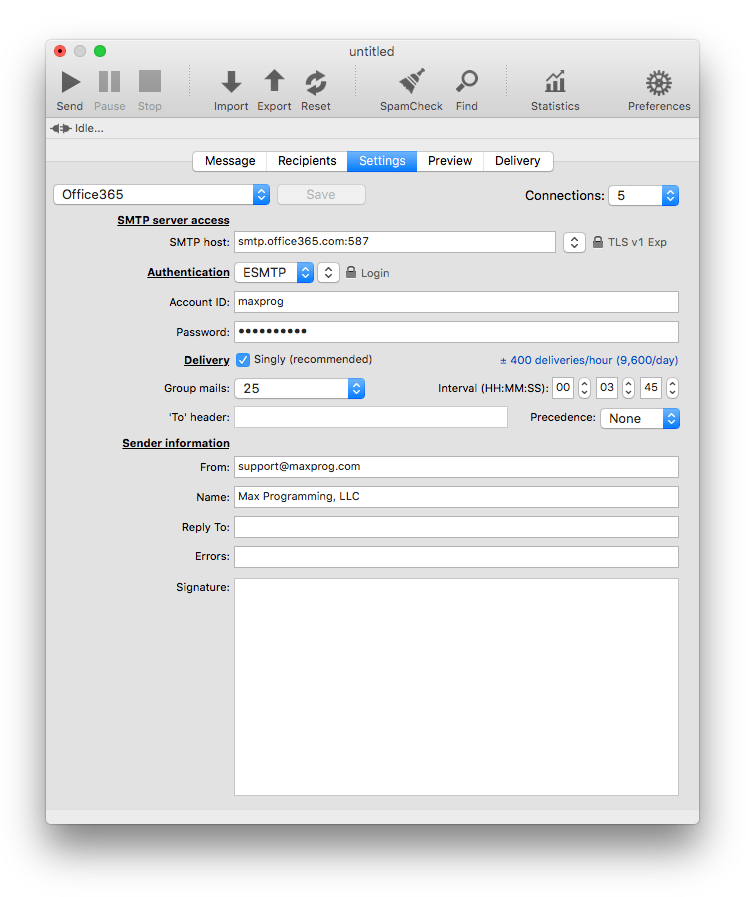
These are the Office365 MaxBulk Mailer settings:
| SMTP server access |
|
SMTP Host |
smtp.office365.com:587 |
|
Connections |
5 |
|
Security |
TLS v1 Exp |
| Authentication |
|
Authentication |
ESMTP | Login |
|
Account ID |
<your_maxbulkmailer_mailbox_id> (Create an App password for MaxBulk Mailer) |
|
Password |
<your_maxbulkmailer_password> (the password of the mailbox you have created for MaxBulk Mailer) |
| Delivery |
|
Delivery |
Singly |
|
Group mails |
25 |
|
Interval |
00:03:45 |
| Sender information |
|
From |
<your_sender_address> |
|
Name |
<your_display_name_here> |
Note that Office365 has several delivery limits: 10'000 messages with up to 500 recipients per message in bulk mode. More information here.
Always double check email addresses of recipients (with eMail Verifier) before hitting the Send button. That’s because your account will get disabled if the email message contains a large number of non-existent or broken addresses (<25 ?) that bounce back on failed delivery.
It is recommended to create an App password for MaxBulk Mailer. Use that App password as your Office365 credentials in MaxBulk Mailer.
Example: