Home Products Downloads News Store Support

Batch deletion | MaxBulk Mailer ▸ Frequently Asked Questions

Batch deletion

MaxBulk Mailer ▸ Frequently Asked Questions

Compatible with MS Windows Compatible with MacOS

Removing several e-mail addresses at once from a list

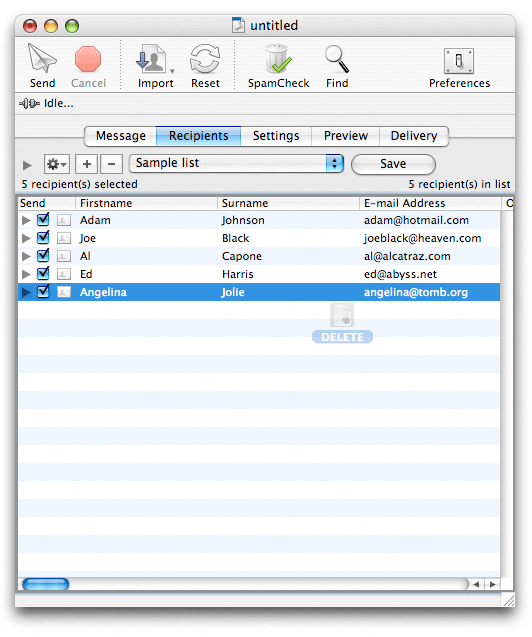
If you need to batch remove e-mail addresses from your MaxBulk Mailer list either because some of your recipients have unsubscribed from your list or your message has bounced, just put all the e-mail addresses to delete into a text file named "DELETE" and drop it onto your master list loaded in MaxBulk Mailer. This will force MaxBulk to remove all those addresses in one pass. For creating your text file you can use your favorite plain text editor like NotePad on the PC or free TextWrangler on the Mac.

Screenshot


 Recent questions from our MaxBulk Mailer users

  How can I Cc and/or Bcc a message with MaxBulk Mailer? NEW YouTube Video
  How to extract Contacts from Outlook Mac (OLM File) NEW Screenshot
  Does MaxBulk Mailer supports List-Unsubscribe ? Screenshot
  Trouble with mlm setup, 'The URL is not valid' error. Screenshot
  Problem with importing recipients Screenshot
  451 Error code Screenshot
  Problem sending email to Gmail recipients Screenshot
  What is the meaning of the recipient panel icons Screenshot
  What is the best mail server I can use with MaxBulk Mailer Screenshot
  How can I export my lists to a new computer Screenshot
  How to send a HTML email Screenshot
  How to hide text in my message Screenshot
  Google ending support for less secure apps YouTube Video
  How to add social networks icons to my message Screenshot
  How do I set up an unsubscribe link Screenshot

 Last videos

🔐 Secured by Sectigo SSL | UptimeRobot - Site Loaded properly