
|
Saving results - User GuideeMail Verifier |

|

|
| 4.- Saving results | |
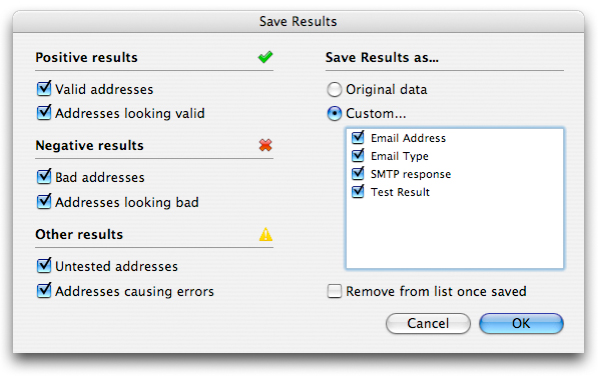
Once the verify process is done you can save the results to a file. To do that, press the 'Save Results' button. You will be asked first to select how those results have to be saved. You have the choice between saving the original data or given columns. You can also partially save the list depending on results. Checking all the boxes will cause eMail Verifier to save the whole list. 'Original data' means your original list. This is handy if your original list contains more columns and you need to maintain them throughout the verifying process. Check 'Remove from list once saved' if you are saving partial data and needs them to be removed from the list on screen. That enables you to re-test the other addresses for example.
For example you can save all the positive results and send your message directly to the corresponding recipients. You can also choose to save only the bad addresses in order to clean your original list. In fact, if you use Maxprog Bulk Mailer, you can name your result file "DELETE" or "UNSUBSCRIBE" and drop it over MaxBulk Mailer recipient list . All addresses from the file will be removed or unsubscribed from the list in a snap! Note that we strongly recommend to use eMail Verifier that way rather than using positive results directly. |
|


Ask your questions here |
