
|
Retrieving Bounces - User GuideeMail Bounce Handler |

|

|
| 5.- Retrieving Bounces | |
eMail Bounce Handler operation is very simple. It has been prepared to accept and process data from all kind of sources so it starts checking if that data corresponds to a bounce or not. In the case it is a bounce, it extracts the recipient email address of the original message. To perform such filtering it uses several sets of rules, some are public and customizable but others are internal and fixed. If eMail Bounce Handler determines the data it has receives corresponds to a bounce and some customizable rules are met the data is processed and recipient address is extracted and added to the bounce list.
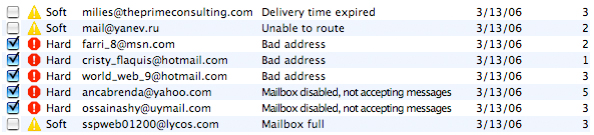
Each list entry is made of a check box, a status icon, the bounce type (Soft or Hard), the extracted email address, the error description, the bounce date and how many times messages sent to that address have bounced. If the address is new, a new entry is created. If the address already exists, the count column on the right is updated. If the bounce count reaches the limit set in the settings panel (below) the address is checked for exportation and icon is changed from a Warning to a Stop icon. Note that Hard bounces are fatal errors thus the check box is automatically checked on entry creation. Soft bounces are generally produced by a temporary condition however if the messages sent to an address cause too many soft bounces we consider it as a fatal error so as soon the threshold is reached the entry is automatically checked.
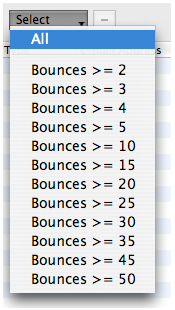
When exporting your bounce list, only checked addresses will be saved. That allows you to use the same list with several campaigns and delete only the addresses producing hard bounces or bouncing too frequently. You can force eMail Bounce Handler to select all entries or select them depending on the bounce count.
eMail Bounce Handler allows you to extract bounce email addresses from both local and remote mailboxes, plain text files and from the Clipboard. Let's see detail-fully how to perform each type of extraction: |
|

 From the clipboard


