Home Products Downloads News Store Support

Doesn't download any file | Web Dumper ▸ Frequently Asked Questions

Doesn't download any file

Web Dumper ▸ Frequently Asked Questions

Compatible with MS Windows Compatible with MacOS

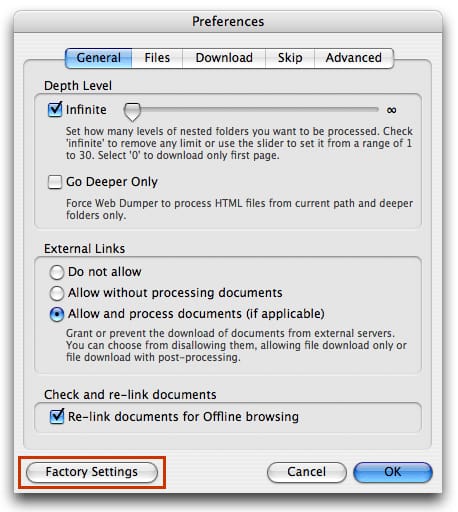
Web Dumper doesn't download anything

If Web Dumper doesn't download anything from your given URL try to reset preferences to default. To do that, open the preferences and press the 'Factory default' button:

Screenshot

Once done, try again to download your URL.


 Recent questions from our Web Dumper users

  How can I download files with sequential numbers in their name? YouTube Video
  What are your payment methods Screenshot
  Nothing is downloaded
  Using the List function
  Empty folder after download

Meet our new apps
AI support that never sleeps
Deploy an AI agent that learns your product, answers customers instantly, and lets one person handle what used to take an entire team. SoftDesk supports both email and chat with ready-to-install widgets.
SoftDesk
AI support that never sleeps
Learn more
Shared family finance made simple
Track income, expenses and everyday household spending in a simple, modern app designed for families, couples and shared budgets.
FamilyCash
Shared family finance made simple
Learn more
Fun learning that keeps kids engaged
Help children build skills through playful activities designed to make learning more enjoyable, motivating and rewarding.
KidBoost
Fun learning that keeps kids engaged
Learn more

 Last videos

🔐 Secured by Sectigo SSL | UptimeRobot - Site Loaded properly