Home Products Downloads News Store Support

Maxprog Logo  

Maxprog Support

Knowledge Base

Trouble with mlm setup, 'The URL is not valid' error.

Topics

Question: I have installed MLM with my bulk mailer, but to complete the setup in the “general settings,” it keeps saying, “The URL is not valid”.

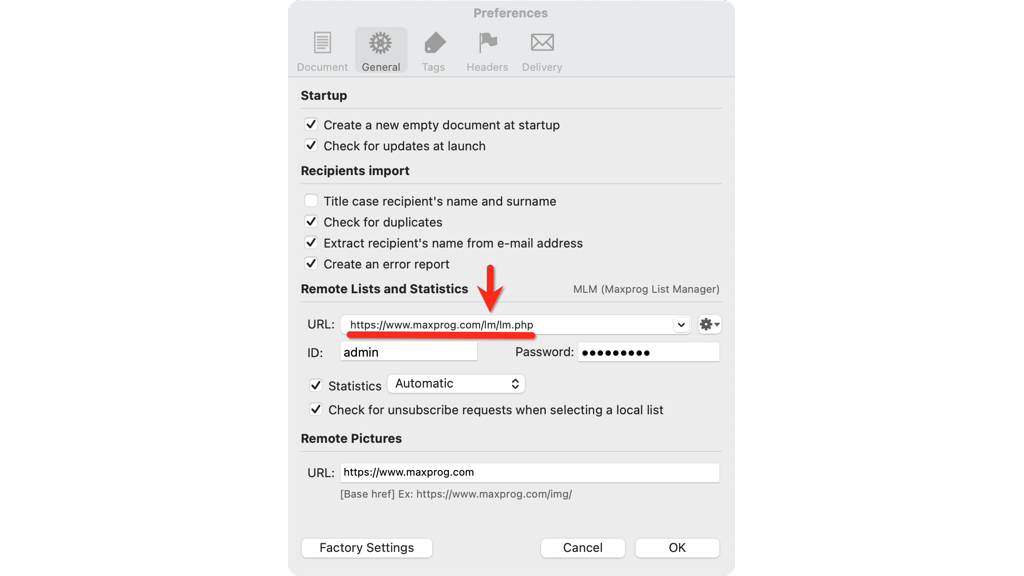
Answer: After installing MLM, depending on the data you provide to the MLM installer, the MLM path in the MaxBulk Mailer preferences is set to the URL of MLM on your server. That URL is created by merging your server address and the installation MLM path. If the data is appropriately entered, the resulting URL will be ok. Any error will cause that URL to be wrong. As a result, you will get a “The URL is not valid” error.

You can fix the problem by checking the MLM URL that the installer in the MaxBulk Mailer preferences has set. MLM tries installing the package to the /lm/ folder by default:

Trouble with MLM setup, 'The URL is not valid' error.

 Recent questions from our MaxBulk Mailer users

  How can I Cc and/or Bcc a message with MaxBulk Mailer? NEW YouTube Video
  How to extract Contacts from Outlook Mac (OLM File) NEW Screenshot
  Does MaxBulk Mailer supports List-Unsubscribe ? Screenshot
  Trouble with mlm setup, 'The URL is not valid' error. Screenshot
  Problem with importing recipients Screenshot
  451 Error code Screenshot
  Problem sending email to Gmail recipients Screenshot
  What is the meaning of the recipient panel icons Screenshot
  What is the best mail server I can use with MaxBulk Mailer Screenshot
  How can I export my lists to a new computer Screenshot
  How to send a HTML email Screenshot
  How to hide text in my message Screenshot
  Google ending support for less secure apps YouTube Video
  How to add social networks icons to my message Screenshot
  How do I set up an unsubscribe link Screenshot

 Last videos

🔐 Secured by Sectigo SSL | UptimeRobot - Site Loaded properly