Home Products Downloads News Store Support

Maxprog Logo  

Maxprog Support

Knowledge Base

Images not displaying in Preview after update to 8.7

Topics

Question: Hello,

I support a handful of MaxBulk users on Macs here, and we are finding that when we update to 8.7, the preview mode no longer displays images. I have 8.6.9 installed alongside 8.7 on my machine, and 8.6.9 displays preview just fine while 8.7 does not.

We tried changing an http image call to https (ssl) but that had no effect.

No firewall rules are different between the two, and network is the same. (It was happening to one user from off network.)

I'm all out of theories. Any suggestions?

Thanks.

Answer: Starting with MaxBulk Mailer 8.7, the 'Preview' panel no longer displays pictures referenced by addresses starting with 'http://' like before. It turns out that Apple announced a new security requirement for iOS and OS X apps: App Transport Security.

From Apple’s docs:

Starting in iOS 9.0 and OS X v10.11, a new security feature called App Transport Security (ATS) is available to apps and is enabled by default. It improves the privacy and data integrity of connections between an app and web services by enforcing additional security requirements for HTTP-based networking requests. Specifically, with ATS enabled, HTTP connections must use HTTPS (RFC 2818). Attempts to connect using insecure HTTP fail. Furthermore, HTTPS requests must use best practices for secure communications.

This change matters to you because MaxBulk Mailer is now using the updated Apple libraries that have this requirement. Simply stated, it means that your URLs have to be secure (https), MaxBulk Mailer now only supports https links!

More information here: Why MaxBulk Mailer now only supports https links
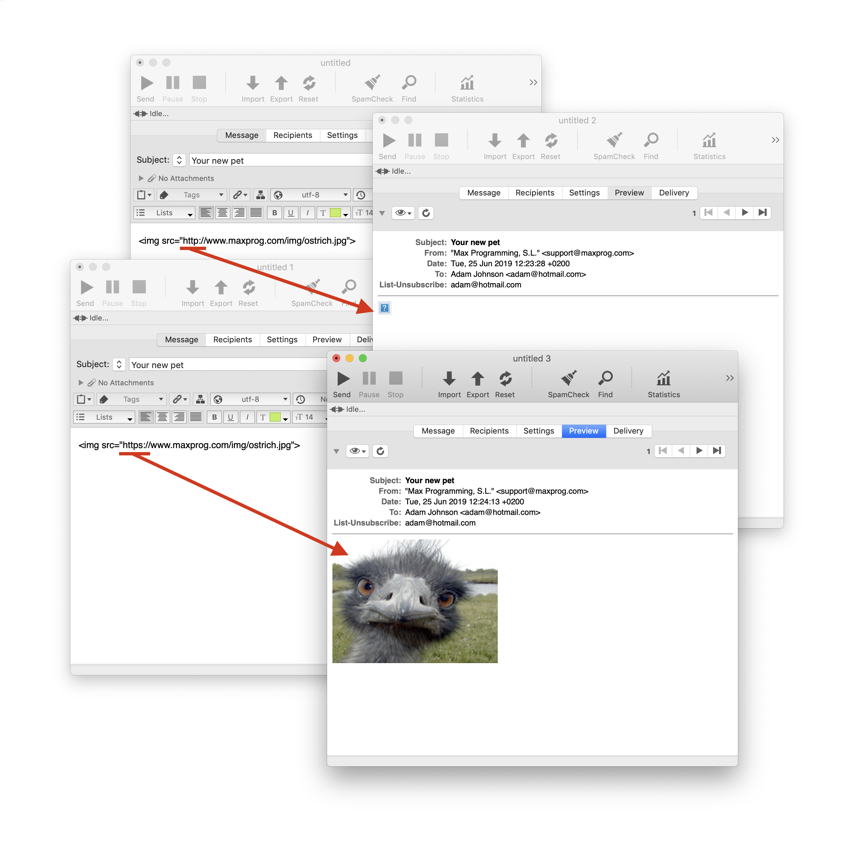
MaxBulk Mailer now only supports https links

 Recent questions from our MaxBulk Mailer users

  How can I Cc and/or Bcc a message with MaxBulk Mailer? NEW YouTube Video
  How to extract Contacts from Outlook Mac (OLM File) NEW Screenshot
  Does MaxBulk Mailer supports List-Unsubscribe ? Screenshot
  Trouble with mlm setup, 'The URL is not valid' error. Screenshot
  Problem with importing recipients Screenshot
  451 Error code Screenshot
  Problem sending email to Gmail recipients Screenshot
  What is the meaning of the recipient panel icons Screenshot
  What is the best mail server I can use with MaxBulk Mailer Screenshot
  How can I export my lists to a new computer Screenshot
  How to send a HTML email Screenshot
  How to hide text in my message Screenshot
  Google ending support for less secure apps YouTube Video
  How to add social networks icons to my message Screenshot
  How do I set up an unsubscribe link Screenshot

 Last videos

🔐 Secured by Sectigo SSL | UptimeRobot - Site Loaded properly

