Home Products Downloads News Store Support

Maxprog Logo  

Maxprog Support

Knowledge Base

How to upgrade from Standard to Pro

Topics

Question: I purchased renewed std version by mistake, entered the serial code, then discovered I need the pro version, so I also purchased the pro version.Now, I don't know how to enter the new (pro) serial code. When I open the app I get a new file. Where is the screen to enter my new serial code?

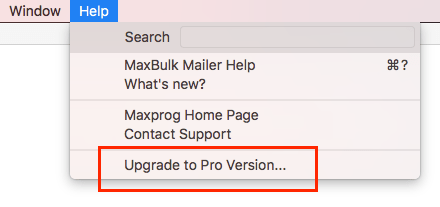
Answer: Usually when the software has not been activated yet, you get an activation window. If it was activated with a standard serial you should indeed get an 'Upgrade To Pro version' menu in the 'Help' menu:

MaxBulk Mailer Pro Update

If it is not the case you can still replace a serial with another by following the steps below:

- Launch MaxBulk Mailer.
- Select the 'About MaxBulk Mailer' menu.
- Right-click the last line of text, the one that reads 'Registered'.
- You will get a contextual popup menu. Select the 'Register' entry.
- You will get a registration window. Input your new serial and click on the 'Register' button.

This menu is new and not yet documented.

 Recent questions from our MaxBulk Mailer users

  Does MaxBulk Mailer supports List-Unsubscribe ? Screenshot
  Trouble with mlm setup, 'The URL is not valid' error. Screenshot
  Problem with importing recipients Screenshot
  451 Error code Screenshot
  Problem sending email to Gmail recipients Screenshot
  What is the meaning of the recipient panel icons Screenshot
  What is the best mail server I can use with MaxBulk Mailer Screenshot
  How can I export my lists to a new computer Screenshot
  How to send a HTML email Screenshot
  How to hide text in my message Screenshot
  Google ending support for less secure apps YouTube Video
  How to add social networks icons to my message Screenshot
  How do I set up an unsubscribe link Screenshot
  How to export several lists into to a single file Screenshot
  What are the Zoho mail settings for MaxBulk Mailer? Screenshot

 Last videos

🔐 Secured by Sectigo SSL | UptimeRobot - Site Loaded properly