Unlike other products iCash uses accounts to represent absolutely everything from Banks to Expenses allowing you to get individual balances at any time, generate customized and detailed reports and track every single money matter. All those accounts are arranged into categories and types.
Categories are freely editable and are classified into types. Types are the topmost account classification. An account can belong to one only category and a category can belong to one only type. Types are not editable. Available types are: Banks, Incomes, Expenses, Liabilities, Portfolio, Assets and Startup. They are all identified with a colored icon on screen and a grey icon on printouts:
| Screen |
|
Printout |
|
Type - Description |
|
|
|
|
Banks checking, savings and cash Accounts. |
|
|
|
|
Incomes accounts - sales, salary, pension, dividends, gifts... |
|
|
|
|
Expenses accounts - auto, clothing, dining, insurances, taxes... |
|
|
|
|
Liabilities - Loans, mortgages and credit cards. |
|
|
|
|
Portfolio - Bonds, Funds, Stocks... |
|
|
|
|
Assets - Home, properties, furniture... |
|
|
|
|
Startup - Accounts you need to set opening balance, not included in reports. |
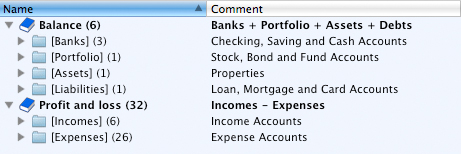
It is extremely important to classify properly your accounts with corresponding types as iCash fully use them to generate reports and to display the general balance. Furthermore Types are organized into 'Balance' and 'Profit and Loss'. Balance types are Banks, Liabilities, Portfolio and Assets. Profit and Loss types are Incomes and Expenses. Balance represents your assets when Profit and loss show your money flow.
|





 Maxprog ® by Stan Busk - © 2001-2026 Maxprog LLC. All Rights reserved