Inicio Productos Descargas Noticias Tienda Soporte

Primeros pasos - Manual Maxbulk Mailer v7 | Envío masivo de e-mails

Primeros pasos - Manual Maxbulk Mailer v7

Envío masivo de e-mails

Compatible with MS Windows Compatible with MacOS

1.- Primeros pasos

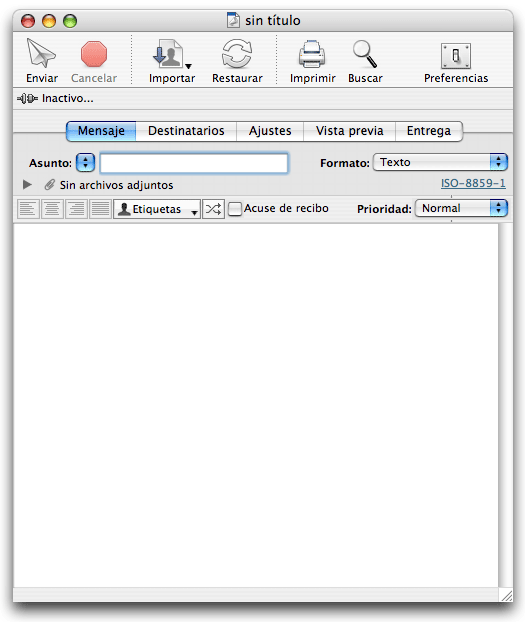
Todos los documentos de MaxBulk Mailer están divididos en cinco paneles cuyos nombres son: Mensaje, Destinatarios, Ajustes, Vista previa y Entrega:

Screenshot

Cuando se disponga a crear sus correos procederá probablemente en este mismo orden. Primero redacta su mensaje y añade eventualmente algunos archivos adjuntos, después selecciona, confecciona o importa la lista de destinatarios, efectúa los ajustes de su cuenta en Internet y comprueba el aspecto del documento con la vista previa. Ya está listo para enviar su primer correo mientras puede visualizar los comandos enviados al servidor y las respuestas de este en el registro de conexión.


 Recent questions from our MaxBulk Mailer users

  How can I Cc and/or Bcc a message with MaxBulk Mailer? NEW YouTube Video
  How to extract Contacts from Outlook Mac (OLM File) UPDATED Screenshot
  Does MaxBulk Mailer supports List-Unsubscribe ? Screenshot
  Trouble with mlm setup, 'The URL is not valid' error. Screenshot
  Problem with importing recipients Screenshot
  451 Error code Screenshot
  Problem sending email to Gmail recipients Screenshot
  What is the meaning of the recipient panel icons Screenshot
  What is the best mail server I can use with MaxBulk Mailer Screenshot
  How can I export my lists to a new computer Screenshot
  How to send a HTML email Screenshot
  How to hide text in my message Screenshot
  Google ending support for less secure apps YouTube Video
  How to add social networks icons to my message Screenshot
  How do I set up an unsubscribe link Screenshot

Meet our new apps
AI support that never sleeps
Deploy an AI agent that learns your product, answers customers instantly, and lets one person handle what used to take an entire team. SoftDesk supports both email and chat with ready-to-install widgets.
SoftDesk
AI support that never sleeps
Learn more
Shared family finance made simple
Track income, expenses and everyday household spending in a simple, modern app designed for families, couples and shared budgets.
FamilyCash
Shared family finance made simple
Learn more
Fun learning that keeps kids engaged
Help children build skills through playful activities designed to make learning more enjoyable, motivating and rewarding.
KidBoost
Fun learning that keeps kids engaged
Learn more

 Last videos

🔐 Secured by Sectigo SSL | UptimeRobot - Site Loaded properly