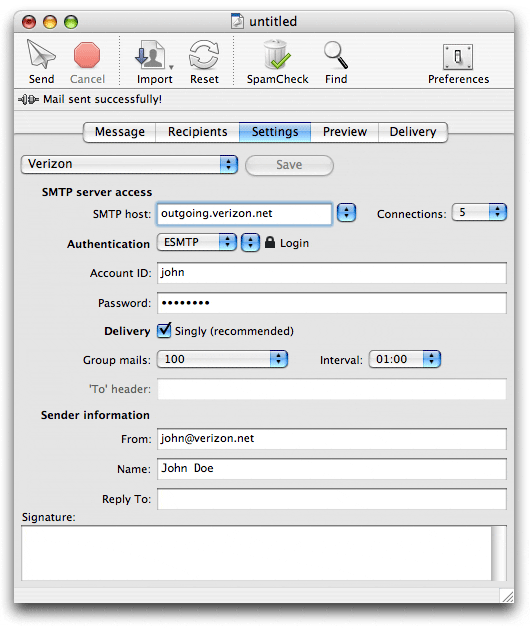
These are the Verizon MaxBulk Mailer settings:
| SMTP server access |
|
SMTP Host |
outgoing.verizon.net |
|
Connections |
5 |
| Authentication |
|
Authentication |
ESMTP | Login |
|
Account ID |
<your_verizon_userID_here> |
|
Password |
<your_verizon_password> |
| Delivery |
|
Delivery |
Singly |
|
Group mails |
100 |
|
Interval |
01:00 |
| Sender information |
|
From |
<your_userID_here>@verizon.net |
|
Name |
<your_display_name_here> |
If you purchased a Verizon Residential Account you will be subject to some limitations regarding the amount of emails you can send per hour. In order to get over those limitations you just need to purchase or upgrade to a Verizon Business Account.
Verizon Residential Accounts has the following delivery limit per hour:
- You may send a single e-mail message to a maximum of 100 recipients in one mailing, not to exceed 500 recipients within a one hour period. All single e-mails sent to over 100 addressees will not be delivered. No notice will be given to you in this case.
- If you send e-mails to more than 500 recipients within a one hour period, your ability to send ANY e-mail messages is suspended for 24 hours. You will receive a Notice regarding this action.
These settings take care of those limitations.
As a precautionary measure to stop spam, many ISPs are no longer allowing outbound traffic on port 25. As a result, your ISP may have blocked port 25 on your account. Port 25 is the standard TCP port used to send e-mail via the SMTP protocol. Hopefully most SMTP servers offer their services through several ports. So, if MaxBulk Mailer can't connect to your server through default port 25 try to use port 587 or 2525. If the 'LOGIN' authentication scheme gives problems try 'PLAIN' from the second pull-down menu next to 'Authentication'.
Example:





 Maxprog ® by Stan Busk - © 2001-2026 Maxprog LLC. All Rights reserved