Efficient and affordable software for Macintosh - Maker of MaxBulk Mailer, eMail extractor, eMail Checker, e-Mail Bounce Handler

Home

Products

Downloads

News

Store

Support

Forums

MaxBulk Mailer™
"The ultimate tool for all of your email marketing needs"


12.- Scheluling deliveries

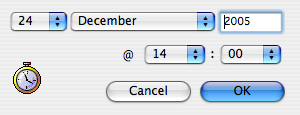
MaxBulk includes a mail scheduling system in order to program e-mail deliveries. It is very simple to use. Once your e-mail is ready to be sent, select the 'Schedule' menu and select the date and time you want your e-mail to be sent.

Scheduling can be useful if you want to have the e-mail go out during a quite time for your network, like at 2 am, so it doesn't impact on your other internet tasks like web browsing and e-mail, but your machine will need to be on, running Maxbulk Mailer and connected to the internet at the scheduled time in order for this to work.

When you click Send (or OK from the Scheduler) you'll probably get a dialogue box warning you that your text is greater than 72 characters wide and to re-warp your text - this is due to the Philips Bar discussed above. Just press the Send Anyway button.


Home

Products

Downloads

News

Store

Support

Forums


Maxprog ® - MAX Programming, LLC - © 2001-2007 - All Rights reserved
Company Info | Site Map | Legal Notice | Privacy Policy | Jobs