Efficient and affordable software for Macintosh - Maker of MaxBulk Mailer, eMail extractor, eMail Checker, e-Mail Bounce Handler

Home

Products

Downloads

News

Store

Support

Forums

MaxBulk Mailer™
"The ultimate tool for all of your email marketing needs"


8.- Delivery

You have the choice between sending to all your recipients on your list or to only part of them. By default, by pressing the 'Send' button at this point you will send your message to all the recipients from currently selected list by default. However you surely have needed to send out a message to a reduced bunch of people at once. Perhaps because you don't want to abuse your ISP server or you simply need to stagger out your deliveries over several days or sessions to avoid getting flooded with responses or bounces. We've found through experience that staggering out the delivery of a message significantly increases your ability to handle responses and bounces more efficiently. You can send to All (Default) or to next xxx pending recipients using the pull-down menu and setting the number of deliveries if required.

You can also perform a partial delivery setting the starting e-mail on your list. Use Message | Partial Sending menu and type the e-mail address from which you want MaxBulk to start. All recipients prior to this e-mail address will be marked as sent.

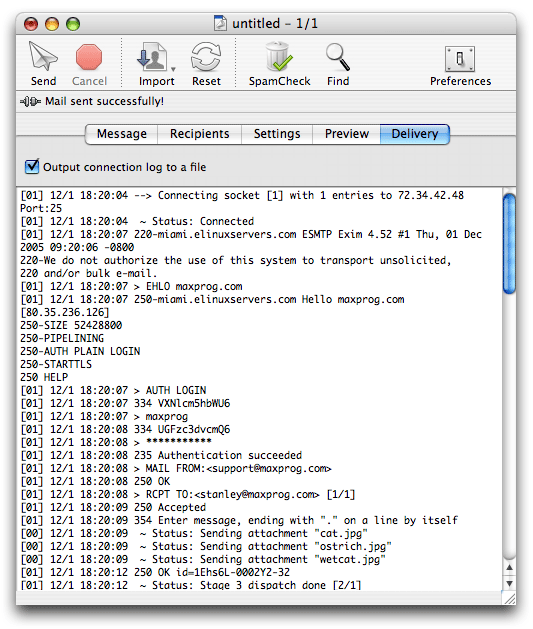
Once you are ready, press the Send button, MaxBulk Mailer will then commence sending your message displaying a log of the transactions with the server. Depending on your settings, it will send one at a time or a batch of them. Either way, you'll get to see it communicate with your SMTP server and the responses it gets back.

If you are in Test Mode, MaxBulk will send the message to yourself only. In order to toggle between 'Test Mode' and regular delivery mode use the 'Message | Test Mode' menu. Once you receive your test mail and if all is as expected, you can deactivate 'Test Mode' and push send button again to get your message delivered to all your recipients. Depending on if you check "Singly" or not, MaxBulk Mailer will send the mail once to all list members or one message per entry in the list (required to replace tags with corresponding data).

You can perform a partial delivery setting the starting e-mail on your list. Use Message | Partial Sending menu and type the e-mail address from which you want MaxBulk to start. All recipients prior to this e-mail address will be marked as sent.

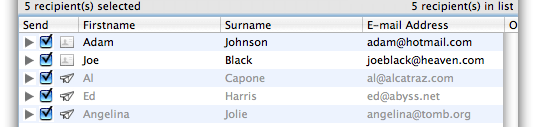
During the delivery MaxBulk updates each recipient status. Delivered and undelivered recipients can be distinguished easily, looking at their icon. A Card icon means message has not been delivered yet, a Paper plane icon means message has been delivered and a Stop icon means an error occurs when processing the recipient.

This allows you to stop and resume a delivery without sending duplicates, already delivered recipients are automatically discarded. This information is saved with your document so if you decide to stop and resume later, just open it back and press the Send button again, already delivered recipients are also automatically discarded.

A delivery report is automatically sent to you by e-mail showing how many messages have been sent, how many were successful and how many failed. The failures are based on those that the SMTP rejected immediately, often because the recipient's domain name didn't exist. It doesn't include bounces - those where the user didn't exist or had a full mail box. You'll get this back as separate e-mail over the period of a few days.

The Delivery Report looks like this:

-----------------------------------------------------------------------
MaxBulk Mailer Delivery Report [#1,290] - 8/26/06
-----------------------------------------------------------------------

     Mailer version: 5.0-US Pro - Registered
   Machine OS/speed: Mac OS 10.4.7/2.147Ghz

            Streams: 5 [5 Used] Single Server
      Delivery mode: Singly (Tag processing ON)

SMTP server address: 69.57.166.166 [Port: Default] SSL Off
     Authentication: ESMTP (Login) | stan-g5-quad.local
             Groups: All at once [Interval: None]

Delivery start date: 12/7/04 at 1:01:55 PM
           end date: 12/7/04 at 1:03:24 PM
     Total duration: 1 minutes and 29 seconds - Retries:0/10
               Rate: 1.72 recipient(s)/second

      to a total of: 152 recipient(s) [152 of 152]
              where: 152 sent successfully

       Mail subject: [PR] MaxBulk Mailer 5.0
      Mail priority: Low
     Return receipt: no
        Mail format: Plain text [ISO-8859-1]
          Mail size: 10.89 KB (Doesn't include attachments)
        Attachments: none

-----------------------------------------------------------------------


Home

Products

Downloads

News

Store

Support

Forums


Maxprog ® - MAX Programming, LLC - © 2001-2007 - All Rights reserved
Company Info | Site Map | Legal Notice | Privacy Policy | Jobs