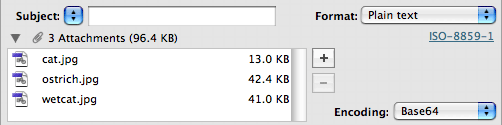
Maxbulk Mailer allows you to send emails with attachments. You can add pictures, PDFs or any kind of file to your message. To add an attachment just drag and drop the file to the clip icon, to the attachment list or directly onto the message.
Click on the disclosure triangle to expand the attachment panel. You can then use the 'Add' and 'Delete' buttons to modify the list and double-click any attachment to open it with its associated viewer application. Command-Click or Control-Click an attachment to replace it. The attachment panel also lets you change the encoding if necessary.
 Encoding
default encoding is Base64. Base64 is fine for the vast majority of attachments. MacBinary, BinHex, AppleSingle and AppleDouble are old legacy formats used by Apple in the past. You can also use UUEncode instead of Base64 but this format is less popular nowadays.
Inline attachments
MaxBulk Mailer gives full support for inline attachments allowing you to display pictures or files right in your message. In fact, inline attachments are files such as pictures you drag and drop directly to your message rather than to the attachment panel. As a result, if you have selected the 'Plain Text' or the 'Styled Text' format, the inline attachments will be displayed in the place they have been dropped. In the case of the HTML format, inline pictures will be embedded inside the HTML code and will be displayed where they are referenced. Note that the attachment tags or picture references should always correspond to the files you have attached to your document.
You have to be very careful about the total size of your attachments when sending individual messages because you will send as many times that size during the delivery. That means sending 10Kb to 1,000 recipients will generate 10Mb traffic! With a 2Kb/s bandwidth it will take 1 hour and 25 minutes.