
|
Settings - eMail Verifier User GuideeMail Verifier |

|

|
| 5.- Settings | |
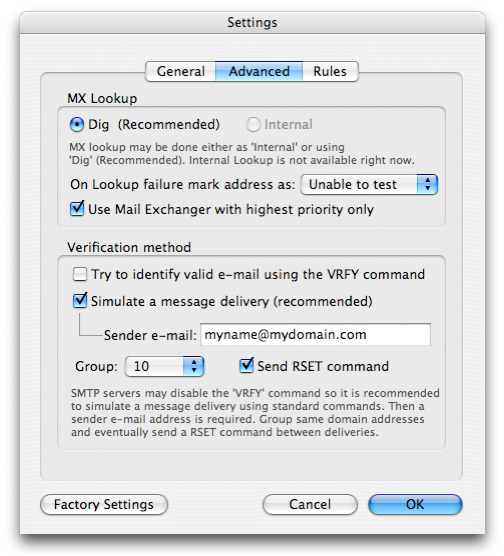
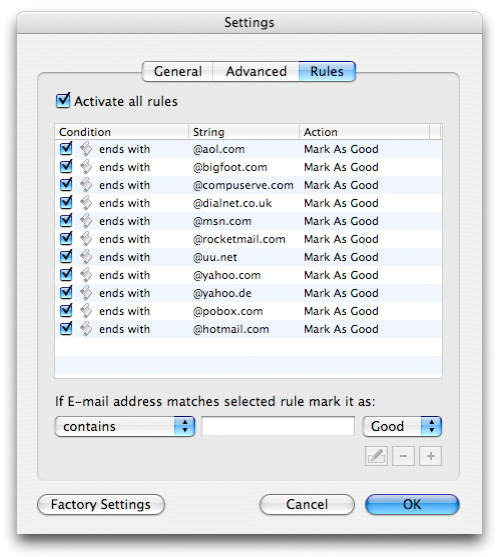
The preference panel is made of 3 parts. General, Advanced and Rules.
Bandwidth: Lets you select how much bandwidth to allocate to eMail Verifier during testing. It is a percentage scale of available system bandwidth from 10 to 100% in steps of 25%. It is recommended to use the default 100% default setting in order to get best performances.
MX Lookup: Depending on your operating system, MX lookup may be done either as 'Internal' or using 'Dig' on Mac OS X or 'nslookup' on Windows.
For some addresses, such as AOL, Yahoo, and other non-SMTP mail, you can't verify whether the address is good or not. You won't know definitively until some bounce. The mail server won't cooperate. In fact, a few ISP's mail servers are configured in a way they prevent anybody to find out if an email address is good or not sometimes to protect their customer email addresses from harvester tools. As a workaround eMail Verifier lets you add rules to mark email addresses as 'Good' or as 'Bad'. A default set is included. You can add/edit/remove rules at your convenience. For example rule #1 will auto-mark all AOL addresses as Good by default. No testing will be done on AOL addresses. We simply consider them all as good. |
|
 General: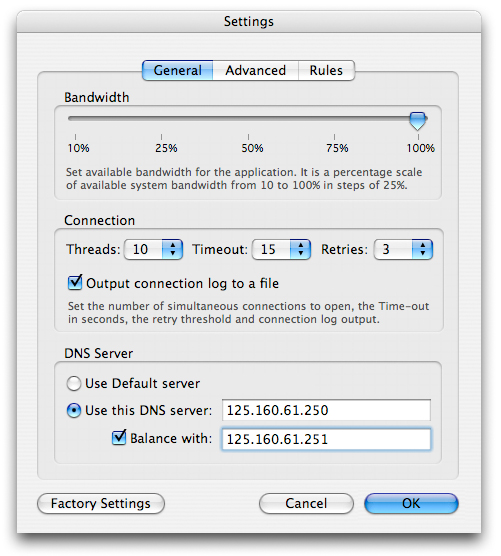


Last videos |
|
Ask your questions here |
