Hi, my name is John. Welcome to our video on personal finance and how iCash can help you manage your finances. Today, we've got something significant to discuss how personal finance software like iCash can transform your financial life. Have you ever wondered where your hard earned money disappears? Stay tuned because we've got the answers. Personal finance refers to the management of an individual's financial resources, including income, expenses, savings, investments, and budgeting. It is essential to have a good understanding of personal finance to make intelligent financial decisions and achieve your financial goals. This is where iCash comes in. Our software is designed to simplify and organize your financial management, making it easier to stay on top of your finances. Unlike other financial software that stores your information on the cloud, iCash keeps all your data on your computer. This means no risk of online hacks or breaches. Plus, with no subscription required to access your data, you can have peace of mind knowing that only you have control over your sensitive information. ICash truly prioritizes the security and privacy of its users. So let's dive in and learn more about personal finance and how iCash can be a valuable tool for you. Jesse, can you explain how iCash can help control your finances? John, one of the critical aspects of personal finance is controlling your income and expenses. This means keeping track of how much money you are earning and spending regularly. With the help of software like iCash, you can easily input all your income sources and expenses, and it will automatically calculate your net income. This will give you a clear understanding of where your money is going and help you make informed decisions about budgeting and saving for the future. Tracking your expenses is like turning on the lights in a dark room. ICash lets you record every expense with ease, no matter how small. So, let's look at how iCash can simplify this critical aspect of personal finance management. One of the critical aspects of personal finance is knowing where your money is going. That's where software like iCash comes in. It lets you easily track and categorize your expenses, clearly showing your spending habits. With this information at your fingertips, you can identify areas where you may be overspending and make necessary adjustments to save money. Plus, with budgeting and goal setting features, iCash can help you stay on top of your financial goals and achieve them faster. So start tracking your expenses today and watch how it saves you money in the long run. One of the biggest mistakes people make regarding their finances is spending money on unnecessary things, also known as ant expenses. These small purchases may not seem like a big deal, but they add up quickly and can throw your budget off track. That's why it's essential to create a monthly budget and stick to it. With software like iCash, you can easily track your expenses and identify any areas where you may be overspending. This will help you avoid those ant expenses and stay on top of your finances. Remember, every penny counts when achieving financial stability and success. ICash provides real time insights into your financial situation. It's your financial GPS, helping you spot areas where you can cut expenses and optimize your budget. Thanks, Jesse. In conclusion, personal finance software like iCash isn't just a tool, it's your financial sidekick. It helps you control incomes and expenses, see where your money goes, and keep those ant expenses in check. Personal finance is about managing your money and making the best financial decisions for your future. It's essential to understand your income, expenses, and investments clearly. With the help of software like iCash, you can easily track and manage all aspects of your finances in one place. From budgeting to investment tracking, iCash offers a comprehensive solution for anyone looking to take control of their financial well-being. So why wait? Start using iCash today and take charge of your financial future. That's a wrap for today's video, folks. If you found this information helpful, please give us a thumbs up and share your thoughts in the comments below. And remember to subscribe for more money saving tips and financial wisdom. You can contact us anytime at chat.maxprog.com or contact.maxprog.com. Please visit our website at maxprog.com. Thanks for tuning in, and we'll catch you in the next one.
The first step in getting your finances under control is keeping records with the help of a good personal finance software !
84.95
64.95
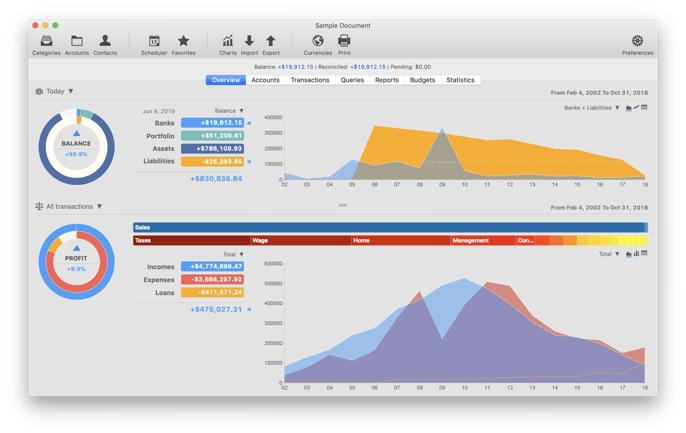
iCash is a software intended to control your personal finances, keeping track of incomes, expenses, credits, debts and Banks transactions for you. As simple as creating the accounts you need and move money between them! You don't even need to know about accounting or even care about it! Your finances depend largely on good organization that lets you know where your money comes from and to where it goes.
iCash is an easy-to-use, full featured and multi-purpose Personal Finance Software for macOS and MS Windows intended to help you control all kinds of money issues. It can serve several small accounting needs for either private users, or clubs, associations, self-employed, small businesses or simply to be used at home, making keeping track of incomes, expenses and Banks transactions a snap. With a few clicks you can begin creating accounts and making transactions in minutes.
iCash is versatile and user-friendly. For this reason it doesn't use the principle of double-entry bookkeeping making it much easier to be used by people with very little or no accounting knowledge at all. Simply create accounts for all your expenses, incomes, Banks... and start moving money between them! It will then allow you to find out where all your money comes from and where it goes. All accounts are well organized according to user-defined categories and built-in types so reports can be tailored to include all records or only ones meeting specified criteria. It also allows you to have as many money manager documents as necessary so you can control almost anything from Clubs, associations, home and so on at the same time.
No accounting knowledge required, no double-entry bookkeeping.
Easy-to-use, straightforward and user-friendly all-in-one interface.
Share your documents between your Mac and your PC hassle free.
Unlimited Accounts, Categories and Contacts.
Logical Account classification by category and type.
Multiple currencies support with exchange rate manager.
Transaction auto-balance and reconciliation.
Scheduled and recurring transactions support.
Full Budget support with customizable calculator.
Project categorization of transactions for queries and reporting.
Pre-defined customizable Reports.
Advanced recordable Queries and Statistics.
Chart creation by account, type, category including Profit & Loss.
Fast Import and Export of Categories, Accounts and Transactions. (OFX, QIF, CSV)
Powerful SQL database engine with auto-backup protection.
Multi-document interface with password protection.
Native versions for Mac OS and Windows.
What People say...
I love using this app! I HATE accounts and accounting and accountancy, but this program does easily enough for me as a one man business without dragging my morale down into the ground with double-frickin'-entry accounting. Who needs it! Less is more with this program. So, a big thankyou to all of you for a program that works perfectly and does everything and more than I need. Sending my stuff through to my accountant is a piece of cake – Richard Whennell
Deductible expenses report.
Category statement report.
SQL engine has been updated to enhance stability, speed, and file security.
Fix: Several user interface aesthetic fixes.
Cryptocurrencies support. You can now have accounts with the currency set to a cryptocurrency (386 supported).
It is possible to automatically update cryptocurrency rates through the internet like regular currencies.
It is now possible to set a custom range in the statistics window, selecting a starting and ending year.
SQL engine has been updated to enhance stability, speed, and file security.
New 24-month, 36-month, 2-year, and 3-year intervals added to the overview P&L pull-down menu.
Interface and database access optimizations.
Fix: Duplicate transactions are not displayed when duplicating in the same month.
Fix: Transaction auto-complete using older transaction for transaction type.
Fix: Crash when trying to edit several transactions at once.
Fix: The Statistics panel is not resetting the column count between queries.
Fix: The transaction panel navigation button now loads the current year/month when clicking on the dot button (current date).
Fix: The transactions rates no longer accepting decimals.
Fix: Issue when trying to select accounts in the Split window.
Fix: Issue with the 'File ▸ Open Recent ▸ Clear Menu' menu not clearing the menu.
Double-click on bank account in the browser now open the account edition panel.
When editing a transaction group comment (aka 'Split') you can now select a previous comment from a list.
SQL engine has been updated in order to enhance stability, speed and file security.
New advanced preference entry to allow adding transactions with a duplicate tracking number.
It is now possible to create a tax report for a given project.
You can now enter/overwrite the transactions tracking number by clicking on the 'Tracking #' label.
The Statistics panel now supports projects, it is now possible to get statistics for a given project.
The Chart windows now supports projects, it is now possible to create a chart for a given project.
When duplicating a group the date is now set to current month and year as with single transactions.
The tracking number field number has been moved to the top right of the entry panel.
The transaction entry panel 'Project' field now displays the projects ordered by date in descending order.
In the transaction entry panel, Control-Click on 'Project' displays project alphabetically with access to the project editor.
You can now sort transactions by tracking number in the Queries panel and transaction panel without pressing the Control or Option key.
Clicking on the 'Tracking #' header while pressing the Control or Option key will sort the transaction by reconciliation status.
Fix: Several interface fixes related to new 'Deductible expense' function.
Fix: Several fixes related to regular/XML imports and 'Deductible expense' info.
Fix: When duplicating a group the custom title is also copied.
Fix: When duplicating a group the tracking number are now properly incremented.
Fix: Several fixes related to panel splitter and splitter docking on main window.
Fix: The currency rates can be updated thru the currency windows again.
Fix: When selecting several transactions in the transaction panel, the SUM is now displayed as before.
Fix: The bank account list listed in the the browser panel is now automatically updated when a bank is modified or created.
Fix: 'Transaction type' field wrongly set by the auto-complete function in given occasions.
Fix: VAT type set in the account panel is now populated when entering a new transaction with that account as the target.
Fix: The Help text for transaction button on MS Windows has been removed and replaced by standard help tags.
Fix: The report panel controls are now disabled when not usable.
Fix: Inaccurate Balance in Account Statement report when selecting 'Current Quarter'.
It is now possible to set an expense transaction as deductible.
It is now possible to set expense accounts as deductible so related transactions will auto-set as deductible.
The toolbar icons have been colored to better distinguish them.
The transaction entry panel buttons has been enhanced.
The transaction entry panel has been updated and now uses different colors.
SQL engine has been updated in order to enhance stability, speed and file security.
Charts, new switch to show/hide starting and ending null values from chart.
Charts, by default starting and ending null values are deactivated and not displayed in the chart.
The transaction entry panel 'Project' field is now ordered by creation date. Alphabetical order is still available by right-clicking.
Refund amount color is now blue as incomes, green color is now used for deductible expenses.
Fix: Transaction split window issue when the vertical scrollbar was displayed.
Fix: The 'Select all' function in the transaction window has been fixed.
Fix: Deleting several transactions at once from the transaction panel is again possible.
Fix: When swapping origin and target accounts in the transaction panel, the add and save buttons no longer get disabled.
Fix: Budgets, when you clicked on a cell to edit an amount only part of the number was being selected.
Fix: The transaction breakdown quantity field now behaves again as expected.
Fix: When creating a new document from a previous one, nothing was imported on given occasions.
Fix: When creating a new account, the account name field is filled with a previous account name on given occasions.
Fix: A new document with a single 0.01 transaction now displays all the information properly all over the application.
Fix: Reports, wrong balance displayed when selecting a date then selecting 'Today'.
Fix: Tax type pull-down menu value not properly set when creating a new transaction using a taxed account.
Fix: Tax type pull-down menu value not properly saved when modifying a transaction using a taxed account.
Fix: Tax type pull-down menu value not properly set when selecting 'Automatic'.
Fix: VAT was not re-calculated when duplicating a transaction and changing the transaction amount.
Fix: Issue preventing the modification of the importing rules on the bank statement import window.
Fix: Charts, 'Last 5 years' and 'Last 10 years' were displaying an unreadable horizontal legend.
Fix: Charts, semester and quarter years are now properly displayed in the data list.
iCash is a software intended to control your personal finance, keeping track of incomes, expenses, credits, debts and Banks transactions for you. As simple as creating the accounts you need and move money between them! You don't even need to know about accounting or even care about it! Your finances depends largely on good organization that lets you know where your money comes from and to where it goes.
iCash is an easy-to-use, full featured and multi-purpose Personal Finance Manager tool for macOS and Windows intended to help you control all kinds of money issues. iCash can serve several small accounting needs for either private users, or clubs, associations, self-employed, small businesses or simply to be used at home, making keeping track of incomes, expenses and Banks transactions a snap.
With a few clicks you can begin creating accounts and making transactions in minutes.
iCash is versatil and user-friendly. For this reason it doesn't use the principle of double-entry bookkeeping making it much easier to be used by people with very little or no accounting knowledge at all.
Simply create accounts for all your expenses, incomes, Banks... and start moving money between them! iCash will then allow you to find out where all your money comes from and where it goes. All accounts are well organized according to user-defined categories and built-in types so reports can be tailored to include all records or only ones meeting specified criteria.
Cash also allows you to have as many money manager documents as necessary so you can control almost anything from Clubs, associations, home and so on at the same time.
▾ Last videos, Online events and Q&A Sessions ▾
🔐 Secured by Sectigo SSL | UptimeRobot - Site Loaded properly