Efficient and affordable software for Macintosh - Maker of MaxBulk Mailer, eMail extractor, eMail Checker, e-Mail Bounce Handler

Home

Products

Downloads

News

Store

Support

Forums

eMail Bounce Handler™
"The best way to deal with bounced e-mails"


3.- Settings

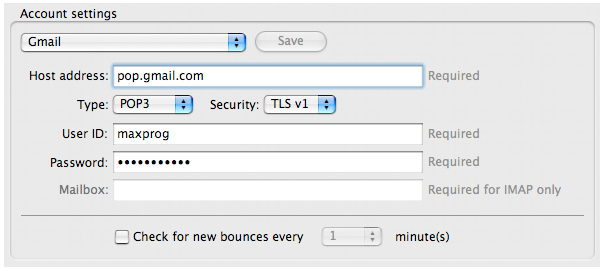
Go to the "Settings" panel and create a POP, APOP or IMAP account.

Enter your:

 Host address: The address of the incoming mail server associated to your account.
 Type: The type of server, POP, APOP or IMAP.
 Security: The security level. Note that the server has to support that security level as well.
 User ID: The User ID to be used when authenticating with the server.
 Password: The Password to be used when authenticating with the server.
 Mailbox: The mailbox to process (IMAP only).

Note that you can create as many accounts as necessary using the account pull-down menu.

 Check 'Check for new bounces every' to set a repeating scheduled connection from 1 to 60 minutes
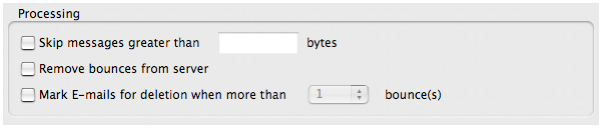
 Check 'Skip messages greater than' to set a message size threshold. Messages bigger than given value in bytes will be discarded.
 Check 'Remove bounces from server' in order to remove bounces from your server once processed.
 Check 'Mark E-mails for deletion when more than' to set bounce threshold in order to auto-check extracted addresses for exportation.


Home

Products

Downloads

News

Store

Support

Forums


Maxprog ® - MAX Programming, LLC - © 2001-2007 - All Rights reserved
Company Info | Site Map | Legal Notice | Privacy Policy | Jobs